Using the Compare Tool to Strengthen Agency Proposals
How to use side-by-side site comparisons to make a proposal feel evidence-based instead of a vague promise of quality.
Proposals that promise “high-authority, relevant placements” without showing any actual sites are easy for a prospect to be skeptical of, especially if they’ve been burned by a previous agency that used the same vague language. Bringing real, comparable site data into a proposal — using a compare tool to line candidates up side by side — makes the pitch concrete and easier to trust.
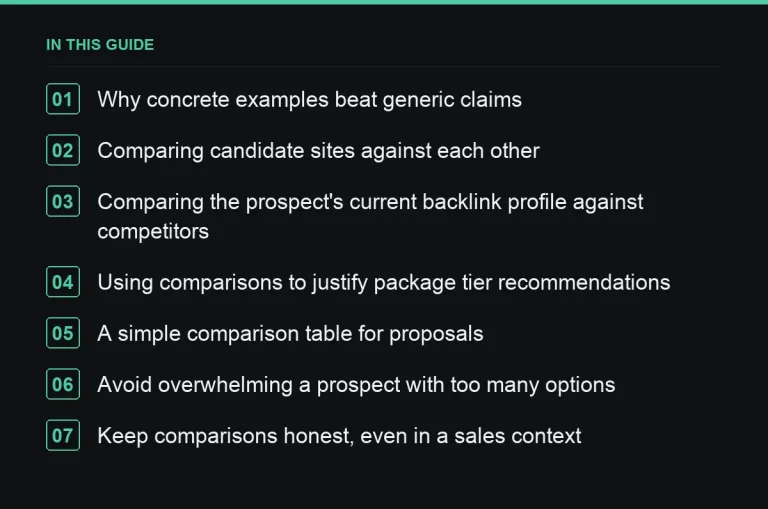
Why concrete examples beat generic claims
Any agency can claim to deliver quality links. Showing three or four real candidate sites, with actual traffic and authority figures side by side, demonstrates that the sourcing process is genuine rather than a placeholder for the sales call. It also gives the prospect something specific to react to — “we’d want the second one, not the third” — which moves the conversation from abstract trust-building to concrete planning.
Comparing candidate sites against each other
Use the compare tool to show a shortlist of prospective sites for the client’s niche, side by side on traffic, DA/DR, spam score and price if relevant. This does double duty: it proves the sourcing capability, and it starts the conversation about which tier of sites fits the client’s budget and goals.
Comparing the prospect’s current backlink profile against competitors
If the discovery call surfaced two or three named competitors (see our discovery questions guide), a side-by-side comparison of link profile strength is a compelling way to frame the opportunity — not as a vague “you need more links” but as a specific, visible gap against a named rival the client already cares about.
Using comparisons to justify package tier recommendations
When recommending a specific package from your productized offering, show the type of site that tier typically includes, compared against a lower and higher tier, so the prospect understands what they’re actually buying at each price point rather than guessing based on a description alone.
A simple comparison table for proposals
| Site | Traffic | DA/DR | Niche fit |
|---|---|---|---|
| Candidate A | High | Mid-range | Strong |
| Candidate B | Mid | High | Moderate |
| Candidate C | Mid | Mid-range | Strong |
Presenting real, specific numbers instead of a table like this with placeholders makes the strongest impression — pull genuine candidate data from your sourcing process rather than illustrative figures for the actual proposal you send.
Avoid overwhelming a prospect with too many options
Three or four well-chosen comparison candidates is more persuasive than a spreadsheet of twenty. The point is to demonstrate judgment, not just data access — curate the list down to the strongest, most relevant candidates for the specific prospect.
Keep comparisons honest, even in a sales context
Don’t cherry-pick metrics that flatter a weak candidate or omit a relevant weakness (like a high spam score) just to make a proposal look stronger. A prospect who later discovers a comparison was selectively framed loses trust fast, and that trust is exactly what a compare-tool-based proposal is meant to build.
Use comparisons to set realistic expectations, not just to impress
A comparison table can also gently correct an unrealistic expectation — showing a prospect that the sites matching their stated budget sit in a certain tier helps calibrate what they should expect to receive, before a contract is signed rather than after a disappointing first month. This use of the tool is quieter than the sales-pitch use, but arguably more valuable for the relationship long term, since it prevents the single most common cause of early client disappointment: a mismatch between what was implied during sales and what the budget can actually buy.
Adapt the comparison format for different audiences
A marketing director might want the full table with every metric; a business owner often prefers a two-line summary of “this one is stronger because X.” Prepare both versions from the same underlying data so you can match the format to who’s actually going to read the proposal, rather than sending the same dense table to everyone regardless of their comfort with SEO metrics.
Reuse the same comparison approach in delivery, not just sales
The habit of comparing candidate sites side by side shouldn’t stop once a proposal is signed. Carry the same discipline into ongoing sourcing, using it to justify site choices in your monthly reporting and to resolve situations covered in our specific-site request guide, where a side-by-side comparison is often the clearest way to explain why one option was chosen over another.
Pair comparisons with a short narrative, not just a table
A table of numbers alone still needs interpretation — add one or two sentences explaining what the numbers mean for this specific prospect’s situation, rather than assuming the data speaks entirely for itself. A prospect unfamiliar with DA, DR or spam score terminology benefits from a plain-language translation alongside the figures.
Where to go next
Comparisons work best as part of a broader scoping conversation, not as a standalone sales gimmick. Explore the marketplace to build your own candidate shortlist for the next proposal you send.
Frequently asked questions
Should the compare tool be used before or after the discovery call?
After — you need to know the client's niche and named competitors first, so the comparison is targeted rather than generic.
How many sites should a proposal comparison include?
Three to four is usually the right range — enough to show range and judgment, without overwhelming the prospect with undifferentiated data.
Is it worth comparing against a competitor's actual backlink profile?
Yes, if you know which competitors the client cares about — it turns an abstract pitch into a specific, motivating gap analysis.
Can this approach work for existing clients, not just new prospects?
Yes — the same technique supports renewal conversations and quarterly reviews, not only new business pitches.
Put it into practice
Filter 54,483 websites by DR, traffic, niche and price, and order with escrow — you pay only after the link is live.
Browse the marketplace