Refreshing Old Content to Recover Rankings
Your old pages already have links and history. Updating the ones in decline often beats publishing something new.
Content decays whether or not you touch it. Competitors publish stronger pages, facts go out of date, and what searchers expect from a result shifts over time. The pages affected by this usually already carry backlinks and years of history, which makes refreshing them one of the more efficient jobs on an SEO roadmap — often faster than starting a new page from nothing.
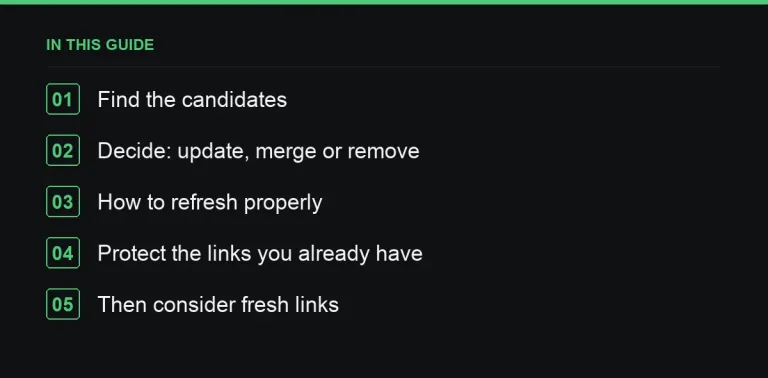
Finding the pages worth refreshing
In Search Console, compare the last three months against the same period a year earlier. The candidates worth prioritising show:
- falling clicks and impressions on a page that used to perform,
- average position slipping for its main queries,
- decent backlinks pointing at it despite weak current traffic — a strong signal it’s fixable rather than dead.
Decide what each page actually needs
| Situation | Action |
|---|---|
| Still relevant, but outdated or outranked | Update and strengthen it in place |
| Several thin pages competing on one topic | Merge into one strong page, 301 the others to it |
| Irrelevant now, no traffic, no links | Remove or noindex; redirect only if it has backlinks worth keeping |
A refresh checklist
- Re-check the intent. Search the main keyword again — has the type of result Google prefers here changed since you wrote it?
- Update facts, dates and examples, replacing anything outdated with current information and a proper source.
- Fill the gaps — add whatever subtopics or questions the current top results cover that yours doesn’t.
- Add something genuinely new: fresh data, a better example, a clearer visual — a real reason for the page to deserve its old ranking back.
- Tighten the structure with clear headings, an early summary, and tables where a comparison helps the reader.
- Update the internal links both into and out of the page — see internal linking.
- Keep the URL exactly as it is. Changing it discards the history and links you’re relying on to make this work.
Only update the published date when the change is substantial. Bumping the date without meaningfully changing the content is a shortcut that tends to backfire once readers or Google notice the mismatch.
Don’t lose the links you already earned
When a page is merged or removed, redirect it to the closest surviving match. Then check your backlink tool for any external links still pointing at a URL that now 404s, and redirect those too — it’s a common way sites quietly lose authority they’d already earned.
Considering fresh links once it’s refreshed
A refreshed page sitting just outside the top results is exactly the kind of page worth treating as a deliberate link target. A handful of relevant placements from the marketplace can help it close the gap faster than waiting for the content changes alone to do the work.
Prioritising when you have dozens of candidates
Most sites of any age have more decaying pages than time to fix them, so rank candidates rather than working through them in date order. Weight pages by three things: how much traffic they used to get, how close they now sit to the first page for their main query, and how many existing backlinks they already carry. A page one or two positions from page one with solid backlinks is usually a faster win than a page that’s fallen to position forty, even if the second page used to get more traffic in absolute terms.
Content that shouldn’t be refreshed
Not every declining page deserves the effort. A page built around a one-off event, a seasonal promotion that won’t recur, or a product you no longer sell is often better retired with a redirect than dragged back into relevance with an artificial update. Refreshing works because the topic is still genuinely wanted; forcing an update onto a page whose topic has actually expired just delays the eventual removal.
Who should own the refresh
Assign a refresh to someone with enough context to actually improve the page, not just polish the prose. Rewriting a paragraph without checking whether the underlying claim is still accurate is a wasted pass. Where possible, have the original author or someone from the relevant team review the update before it goes live — they’re the ones most likely to catch a fact that’s quietly gone stale since the page was first written.
Tracking whether the refresh worked
Set a reminder to check performance again eight to twelve weeks after publishing the update, not the next day. Search engines take time to reassess a page, and judging a refresh within the first week almost always looks worse than the eventual result. Compare the same metrics you used to flag the page originally — clicks, impressions and average position for its main queries — against both the pre-refresh baseline and the same period a year earlier, so a seasonal dip doesn’t get mistaken for a failed update.
Where to go next
Refreshing works best alongside a plan for what new content you publish next — see writing an SEO content brief — and for pages you’re keeping purely as reference resources, read what makes content earn links on its own.
Frequently asked questions
How often should important pages be reviewed for a refresh?
At least yearly for anything that drives meaningful traffic, and sooner for topics that move quickly, such as pricing, regulation or fast-changing tools.
Does changing the published date improve rankings on its own?
No. Substantial content improvements are what matter. Changing the date without changing the substance is misleading to readers and doesn't fool search engines either.
Should the URL change when a page is significantly rewritten?
No, keep it. The URL is what's carrying the accumulated links and ranking history you're trying to make use of.
What if a page has good backlinks but the topic is no longer relevant to the business?
Redirect it to the closest relevant page rather than deleting it outright, so the existing backlinks continue to pass value somewhere useful.
Put it into practice
Filter 54,483 websites by DR, traffic, niche and price, and order with escrow — you pay only after the link is live.
Browse the marketplace