Link Building Reporting Templates That Clients Actually Read
Reporting formats that get read, not filed away, including a monthly summary table and a narrative structure.

A lot of agency reporting gets sent, opened once, and never referenced again — usually because it’s a spreadsheet dump with no narrative, or a wall of text with no data a client can point to when justifying the spend internally. Good link building reports do two jobs at once: they show exactly what was delivered, and they give the client language to defend the budget to their own boss.
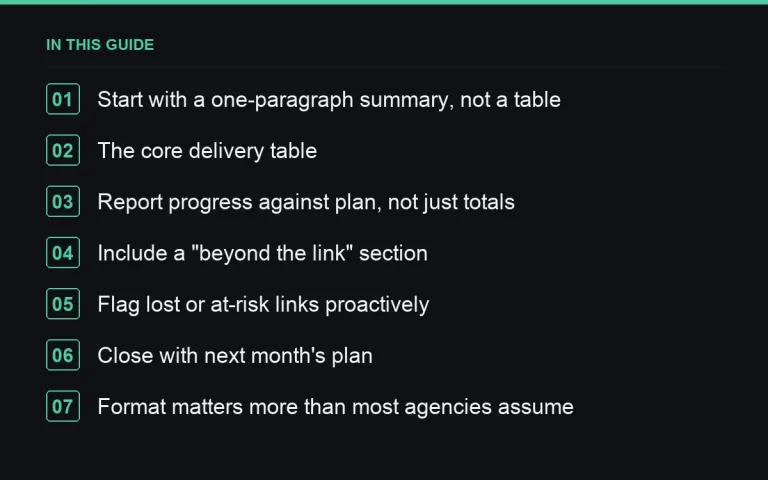
Start with a one-paragraph summary, not a table
Open every report with two or three sentences: what was delivered this month, how it compares to the plan, and one thing worth flagging (a delay, an opportunity, a risk). Busy clients read this paragraph and skim the rest; put your best information first, not buried under a data table.
The core delivery table
This is the part clients forward to their own stakeholders, so keep it clean and consistent month to month.
| Publisher URL | Target page | Anchor | DR/DA | Est. traffic | Published | Status |
|---|---|---|---|---|---|---|
| example-publisher.com/article | /product-page | brand term | 45 | 8,000/mo | 2026-03-04 | Live |
Keep the same column order every month so clients can compare across periods without relearning the format. If you’re sourcing through a marketplace, this data is usually already available per listing and can be pulled directly rather than re-researched by hand.
Report progress against plan, not just totals
A raw count of links delivered means little without the target it’s measured against. Show planned versus delivered for the month, and a running year-to-date total, so a slower month reads as a variance to be explained rather than an unexplained shortfall.
Include a “beyond the link” section
Link counts alone undersell the value of good placements — referral traffic, brand mentions without a link, and content quality all matter. See our guide on proving value beyond link counts for what to include here; even a short qualitative note about placement quality or publisher audience fit adds context a table can’t.
Flag lost or at-risk links proactively
Publishers redesign sites, remove old content, or drop links during a content audit. Rather than let a client discover this independently, include a short “link health” section drawing from your link monitor, even if the news is “one link removed, replacement in progress.”
Close with next month’s plan
End every report with two or three lines on what’s planned next — target sites being pursued, any strategy shift, upcoming deliverables. This turns the report from a look backward into a forward-looking document, which is what actually supports renewal conversations.
Format matters more than most agencies assume
A live dashboard suits clients who check in frequently; a static monthly document suits clients who only review reporting during a scheduled call. Decide this at the scoping stage, not after building one and hoping it fits. If you export data via CSV or the API, you can automate a lot of the table population and spend the saved time on the narrative sections instead.
Give the client a way to ask questions about the report
End every report with a short line inviting questions, and make it genuinely easy to reach someone — a named contact, not a generic inbox. Clients who feel able to ask “what does this number mean” without friction tend to stay more engaged with reporting over time, rather than letting confusion quietly accumulate into disengagement.
Keep terminology consistent across the whole document
If “traffic” means organic search traffic in one section and total site traffic in another, or “live” is used loosely for both “published” and “indexed,” clients notice the inconsistency even if they can’t quite articulate why the report feels unclear. Define terms once, ideally in a short glossary note the first time a report is sent, and use them identically every month afterward.
Adjust depth by client sophistication, not just by package tier
A marketing director who reads reporting weekly wants a different level of detail than a business owner who checks in once a quarter. Ask, during discovery, how technical and how frequent the client wants reporting to be, and adjust accordingly — a highly detailed report sent to someone who only wants a two-line summary is just as much of a miss as a thin report sent to someone who wants to see every metric.
Run every report through your own QA before sending it
A report with a wrong DA figure or a mismatched publish date undercuts the very trust reporting is meant to build. Treat the report itself as a deliverable that goes through the same discipline as the placements it describes — cross-check figures against your QA checklist data rather than retyping numbers from memory or an old draft.
A simple monthly report structure
- One-paragraph summary
- Delivery table (planned vs. delivered)
- Beyond-the-link notes
- Link health / at-risk links
- Next month’s plan
Where to go next
Reporting is only as good as the underlying data, so pair it with a real QA process before delivery and consistent sourcing from a vetted marketplace so every row in the table stands up to scrutiny.
Frequently asked questions
How long should a monthly report be?
Short enough to read in five minutes. A one-page summary plus a delivery table covers most client needs; anything longer usually gets skimmed rather than read.
Should reports be automated or written by hand each month?
A hybrid works best: automate the data table pull, and write the summary and next-steps sections by hand so they reflect the actual month rather than a generic template.
What if a month had no new links?
Say so directly and explain why — a slow publisher response period, a strategic pause, a focus month on outreach only — rather than padding the report to look busier than it was.
Do small clients need the same reporting depth as large ones?
The structure should be the same; the depth can scale down. Even a small monthly retainer deserves a summary, a delivery table and a next-steps line.
Put it into practice
Filter 54,483 websites by DR, traffic, niche and price, and order with escrow — you pay only after the link is live.
Browse the marketplace