Protecting Site Speed While Accepting Guest Content
Guest content is one of the most common, avoidable sources of site speed degradation over time.

Site speed rarely collapses overnight. It erodes gradually, one oversized image or embedded script at a time, and guest content is one of the most common sources of that erosion because it comes from outside your usual production pipeline. A few consistent checks at submission time prevent most of the damage.
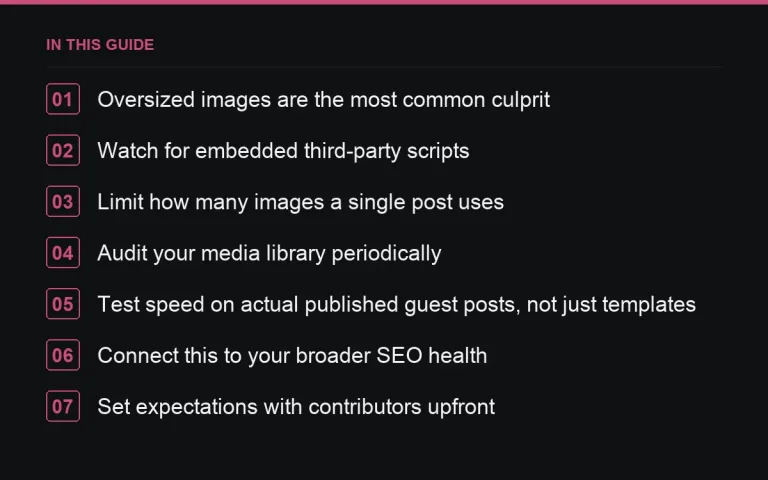
Oversized images are the most common culprit
Contributors frequently submit images straight from a phone or an unoptimized export, sometimes several megabytes for a single header image. Set a maximum file size in your https://successtoroad.com/blog/image-and-copyright-rules/ and enforce it before publishing, either by rejecting oversized files or compressing them yourself as a standard editorial step.
Watch for embedded third-party scripts
Sponsored posts sometimes arrive with embed codes for videos, social posts, or interactive widgets that quietly load additional third-party scripts. Each one adds its own render-blocking or tracking overhead. Review any embed code before publishing rather than assuming it is safe because it came from a recognizable platform, and decline embeds that are not clearly necessary to the content.
Limit how many images a single post uses
A guest post with a dozen images each pulled from different sources multiplies your exposure to both speed problems and licensing risk. Set a reasonable maximum in your guidelines — most guest posts do not need more than two or three images to make their point.
Audit your media library periodically
Over time, unused or duplicate images from old guest posts accumulate in your media library, some of them unnecessarily large. A periodic audit — quarterly for an active site — catches images that were never properly compressed at submission time and gives you a chance to fix them retroactively.
- Compress images to a set maximum file size before publishing
- Review embed codes for third-party scripts before accepting them
- Cap the number of images per guest post
- Run a periodic site speed check specifically on your guest content pages, not just your homepage
Test speed on actual published guest posts, not just templates
A clean site template can still produce slow individual pages once real guest content is dropped in. Periodically test a sample of your actual published guest and sponsored posts with a speed testing tool, not just your homepage or a blank template, since that is where contributor-submitted media actually lives.
Connect this to your broader SEO health
Site speed is one of several technical factors that feed into how a site performs and how it is perceived by buyers evaluating it for a placement (see https://successtoroad.com/blog/how-buyers-evaluate-your-site/). A site that has quietly slowed down due to years of unoptimized contributor uploads is harder to diagnose than one with a single obvious cause, which is why prevention at submission time is more efficient than periodic cleanup alone.
Set expectations with contributors upfront
Most contributors are not trying to slow your site down; they simply do not think about file size. A single line in your submission checklist — “images compressed to under X MB” — combined with your https://successtoroad.com/blog/submission-checklist-for-guest-authors/, prevents most of this at the source rather than requiring you to fix it after the fact.
Speed matters more on your highest-traffic pages
Not every page needs equal attention. Prioritise speed checks on the pages that carry the most traffic and the pages most likely to be evaluated by a buyer browsing https://successtoroad.com/marketplace/ before placing an order, since these are the pages where a slow load has the largest practical cost, both in lost readers and in how the site is perceived commercially.
Explain speed standards to sponsored content buyers too
If a buyer’s brief specifically requests an embedded video, widget, or interactive element, explain the trade-off with site speed before accepting the order rather than after publishing it and noticing a slowdown. Most buyers are willing to accept a lighter-weight alternative once they understand the actual reason for the request.
Do not let a redesign undo years of speed work
A new theme or template can quietly reintroduce problems you already solved, particularly around image handling and third-party scripts bundled into new design elements. Treat any significant site redesign as a moment to re-run your speed checks from scratch rather than assuming a newer design is automatically a faster one.
Make speed part of your acceptance criteria, not an afterthought
Rather than treating speed purely as something to fix after publication, build a quick speed-impact check into your review process for any submission with more than a couple of images or an embedded element. Catching an issue before publication, while the post is still a draft, is considerably less work than diagnosing a slowdown across many already-live pages months later.
Explain the trade-off to your own editorial team too
Editors who do not understand why file size matters will happily approve a heavy image if the rest of the post looks strong. A short internal note explaining the actual cost of an oversized image, in plain terms, tends to get this checked consistently far more reliably than a rule enforced only by whoever happens to remember it that week.
Where to go next
Read https://successtoroad.com/blog/publisher-seo-hygiene-checklist/ for how speed fits into your broader technical health, and https://successtoroad.com/blog/image-and-copyright-rules/ for the licensing side of the same submission process.
Frequently asked questions
What is the most common way guest content slows down a site?
Oversized, uncompressed images submitted by contributors are the most frequent and most avoidable cause. Third-party embed scripts in sponsored posts are a close second.
Should we compress images ourselves or require contributors to do it?
Both help. Setting a maximum file size in your guidelines reduces the problem at the source, but a final compression check before publishing catches anything contributors miss.
How often should we audit our media library for old, unoptimized images?
Quarterly is a reasonable cadence for an active site that regularly accepts guest content, since unoptimized images accumulate steadily rather than appearing all at once.
Do embedded videos or social posts in sponsored content affect site speed?
Yes, often more than a single image would, since embeds can load additional third-party scripts. Review embed codes before publishing rather than accepting them automatically.
Put it into practice
Filter 54,483 websites by DR, traffic, niche and price, and order with escrow — you pay only after the link is live.
Browse the marketplace